
Compatibility
Minecraft: Java Edition
Platforms
Supported environments


Tags
Creators
Details
IRLights
A standalone, in-game real-time lighting editor for Minecraft
It's made for Fabric 1.20.1-1.21.11. However, 1.20.1 build can be used on Forge and NeoForge (1.21.1) with Sinytra Connector mod
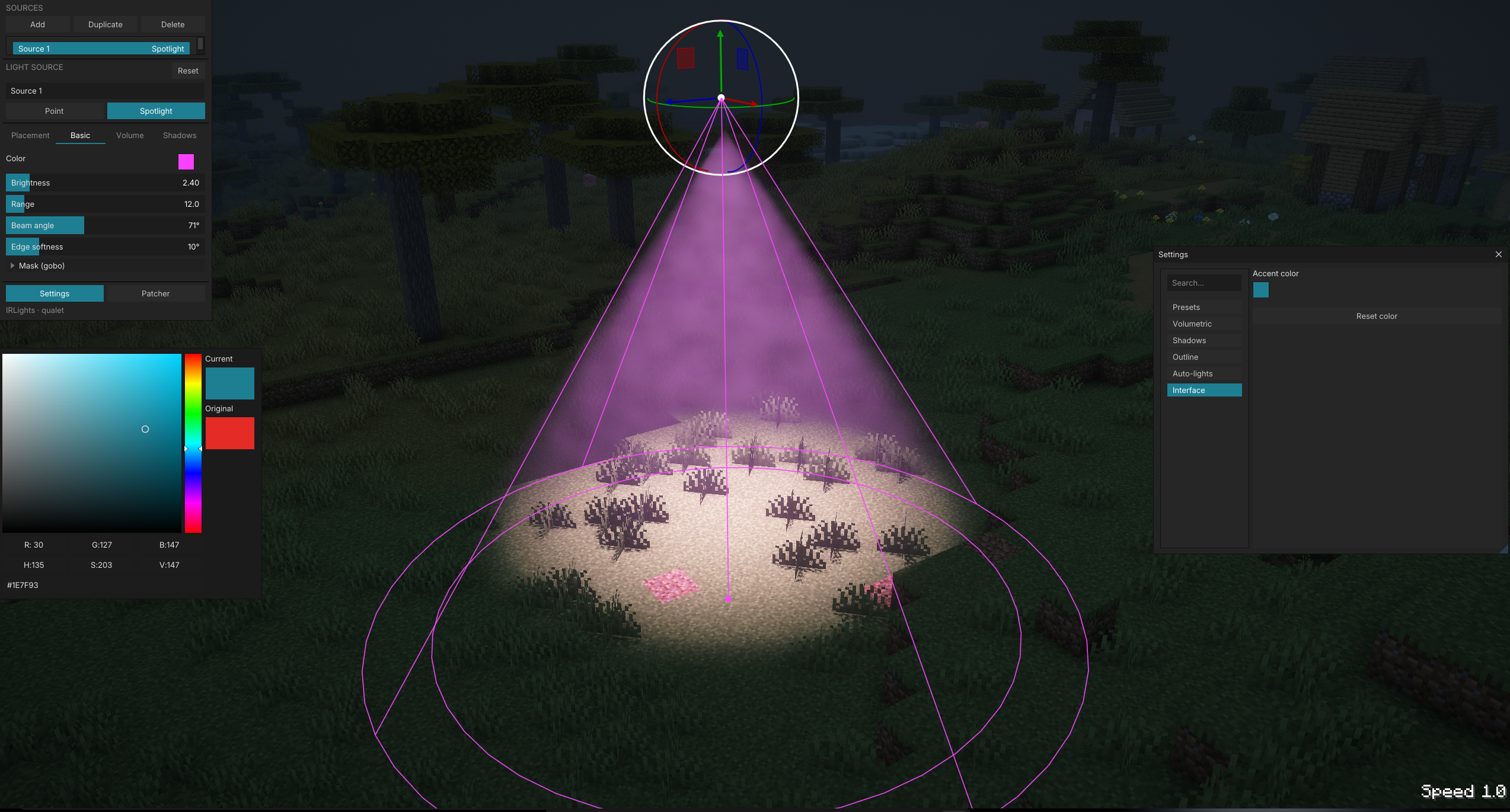
IRLights lets you place and sculpt dynamic point lights and spotlights directly in your world through a built-in ImGui editor. It comes with real-time shadows, volumetric light, and projected light patterns (gobo/cookie). Everything renders through the Iris shader pipeline, and the mod works entirely on its own: no BBS, nothing beyond Fabric and Iris.
Features
- In-game ImGui light editor. Press a key and a floating panel opens over your world. Add, select, and edit lights with a 3D gizmo (drag to translate/rotate) or with precise numeric fields.
- Point lights & spotlights with full control over color, intensity, range/radius, cone angle (inner/outer), bulb size (shadow softness), and independent block/entity light masking.
- Real-time shadows. Both world blocks and entities cast shadows. Quality presets go from Low to Ultra, and a scene-aware cache only re-bakes what actually changed.
- Volumetric lighting with configurable beam strength, density, and anisotropy, for god-rays through fog, smoke, and dust.
- Gobo / cookie projection. Project a black-and-white PNG pattern out of a spotlight's cone, onto surfaces and through the volumetric beam, with rotation, scale, and invert controls.
- Free-fly camera. While the editor is open, fly freely around the scene to line up lights without being tied to your player's movement.
- In-world guides: interactive wireframe overlays showing each light's reach, cone, and falloff, with drag handles on the selected light.
- Auto block-lights (experimental, opt-in). Turns emissive vanilla blocks like torches, lanterns, and glowstone into real point lights automatically, so existing builds light up without placing anything by hand.
- Persistent scenes. Lights are saved per world/server and reload automatically.
- Replay Mod support. The editor overlay works both in free-fly and in timeline mode, so you can light scenes for cinematic playback.
- Localized UI in English and Russian out of the box.
Supported shader packs
IRLights ships a source patcher that injects its lighting code directly into popular Iris shader packs:
- Photon
- Complementary Reimagined
- BSL
- Bliss
- Solas
- IterationRP
- Rethinking Voxels
Pick a pack from the in-editor patcher panel, patch it once, and lights render with full shadow and volumetric support.
Requirements
- Fabric Loader
- Fabric API
- Iris Shaders plus a supported shader pack from the list above (you won't see any lighting without it)
No BBS, no other content mods. IRLights is fully standalone.
Installing
- Install Fabric Loader, Fabric API, and Iris.
- Drop the IRLights jar into your
modsfolder. - Launch the game once so IRLights can extract its bundled shader patches.
- Open the editor, pick your shader pack in the patcher panel, and patch it.
- Enable that shader pack in Iris, open the editor again, and start placing lights.
Credits
Created by qualet.
License
Licensed under MIT.